

KMPlayer for Windows: A free alternative to Windows Media Player
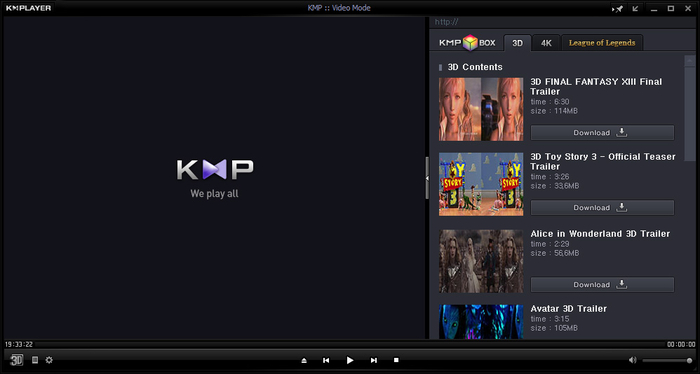
Explore KMPlayer for Windows, a world of outstanding multimedia playback on your computer. KMPlayer is your ticket to stunningly clear video and audio thanks to its support for various codecs, including 3D, 4K, and Ultra High Definition.
If you're seeking a multimedia player that offers unmatched compatibility, customization, and control, look no further. Download KMPlayer today and discover the true potential of your media collection.
KMPlayer for Windows review
KMPlayer is a versatile multimedia player that supports various video formats, including 3D, 4K, and Ultra High Definition. Its flexibility in decoding various codecs makes it a powerful choice for media enthusiasts.
The program excels in its ability to customize settings, apply filters, and even schedule your computer's shutdown after watching a video. However, it's important to note that the program's extensive functionality may require some technical knowledge.
In terms of performance, KMPlayer offers a smooth and stable playback experience, even for high-definition content. It can handle a variety of file formats without any significant issues. However, the presence of in-program advertisements may be a downside for some users. These ads can be distracting, especially when watching a movie, unless you opt for full-screen mode.
KMPlayer seamlessly integrates with downloadable video sites like Facebook, YouTube, Twitter, and Daily Motion. This integration enhances its functionality by allowing users to access content from various sources.
Key KMPlayer features
Here are the key features that make KMPlayer stand out:
- Versatile format support: KMPlayer can handle a plethora of video formats, including WMV, MKV, OGM, 3GP, FLV, and MOV, making it your go-to choice for playing diverse content.
- Customization: Enjoy the flexibility to adjust settings, sync audio, skip and repeat sections, and apply various filters to enhance your viewing experience.
- Advanced image processing: Elevate your videos with the ability to tweak playback speed, reduce noise levels, and even schedule your computer to shut down after a video.
KMPlayer system requirements
KMPlayer is available for Windows and offers high compatibility with numerous file formats, ensuring users can play various movies and videos. However, you must first meet the following requirements:
- Operating system: Windows 10 or later
- Processor: Intel Core i3 or equivalent
- RAM: 4GB
- Storage: 100MB
KMPlayer alternatives
KMPlayer for Windows faces competition from other multimedia players like 5KPlayer and PotPlayer, which also offer extensive functionality. The choice between these programs depends on the user's technical proficiency and customization requirements.
For those who prefer a more straightforward and user-friendly experience, VLC Media Player is a viable alternative. However, if you are comfortable with your technical skills, you should not pass up this free tool.
Highly functional but complex program
KMPlayer is a fantastic all-around video player that can play almost any format. Even while it's preferable to Windows Media Player for some people, it might not be for you. It's possible that its non-standard features will prevent certain people from using it. KMPlayer is a popular choice among power users who desire more control over their media player.
Are you one of them? Try KMPlayer for Windows today and step into the world of advanced multimedia players.







.png)























User reviews about KMPlayer
by ANYONE
Please increase the audio quality, then not a single mia player can cross you, you have every single thing to be in the top
by Marivic Ramirez
okay to used & accessible....................................................................
by Greg Johnston
Just loaded, if it works as well as the set up was easy look forward to a better rating.
by Shorif Khan
awesome software and im using this app very smothly and usefull this software
by Map Paul
Good
and so convenient
simple to use and too faster
very clear and has a nice interface
by ADAM RIDAL
nk about KMPlayeYour review for KMPlayer
10
Thank you for rating!What do you think about KMPlayer Do you recommend it? Why?